
You can find more answers to your questions about the Screener software below.
"I have a student that's on my list who is not in my classroom..."
At the top of the student's screening page, select the button that reads "XXXX is not my student." The student will then be moved to an administrator's page to be reassigned to another teacher's list.
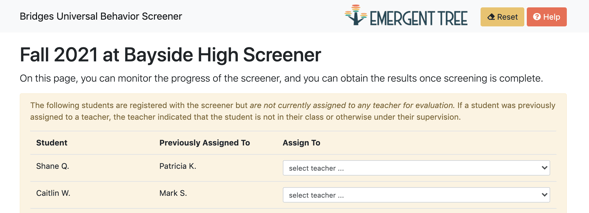
"I'm an administrator: how do I reassign a student to another teacher?"
A teacher who does not feel that should screen a student will select the "XXXX is not my student" on their screening page. This student will then show up at the specific campuses page on your admin dashboard. You can then reassign the student to the correct person to screen them.
"I have a new student who was not included in the screener..."
The new student will be captured during the next screening window. This will give the student an opportunity to learn the school expectations and give teachers time to get to know the student before rating them. Since they are new to your roster, the students may be considered to have some elevated risk and can still be monitored by the Tier 2 team.
"How can I screen a student who is on my roster, but has not attended class (virtual learning and not logged in to a scheduled class time)?"
If you or your administrator/s need more assistance on how to rate a student, please reach out to your ETE consultant.