![ete-logo-blue-2.png]](https://help.emergenttree.com/hs-fs/hubfs/ete-logo-blue-2.png?height=40&name=ete-logo-blue-2.png)
Quick Links
Add a pathway to a student's existing scale
Add/create a pathway to a new scale
View the video below to learn more about how to create a Competing Behavior Pathway for a student on your campus.
Adding a pathway to a student's existing scale
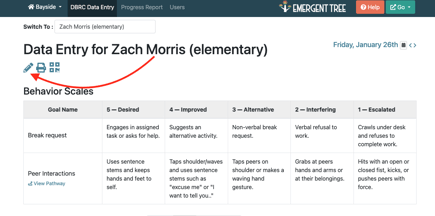
1. select the edit button next to the student's name on the DBRC Data Entry tab
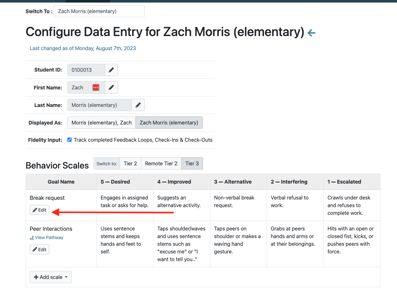
2. find the goal name from the behavior scale where you'd like to add the pathway
3. select the edit button
4. select how you'd like to move forward:
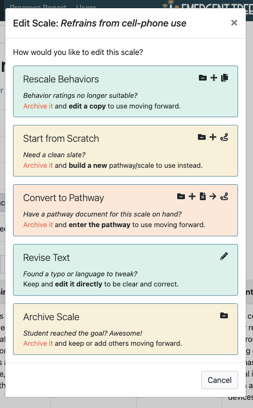
5. to update the goal to add a pathway, select the "convert to pathway" option
6. Enter the information in each box required:
Consequences that Maintain
these Interfering Behaviors
Describe the outcomes that reinforce the interfering behaviors, making it more likely that Stacey will maintain or continue to engage in this behavior in the future. This should not include punishments, unless those are inadvertently reinforcing the behavior.
Antecedents that Predict the Behavior
Describe the relevant events that immediately precede and may serve to trigger the interfering behavior.
Setting Events that Increase Likelihood
Describe any circumstances or earlier events that can increase the chances that interfering behavior will occur.
Enter the Specific Hypothesized Function
What is the primary motivation or purpose driving Stacey's behavior?
Select the type & target that best match the outcome Stacey is seeking to achieve.
Consequences to Reinforce
the Desired Behavior
Describe the outcomes that should occur after the student engages in the desired behavior, which will reinforce their choice, making it more likely that Stacey will choose to engage in this behavior in the future.
Consequences to Reinforce
the Alternative Behaviors
Describe the outcomes that will satisfy the function of Stacey's behavior, thereby reinforcing the alternative behavior, and making it more likely that Stacey will choose this over the interfering behavior in the future.
Please enter a Goal Name for the behavior scale to complete your pathway.
7.select "complete pathway"
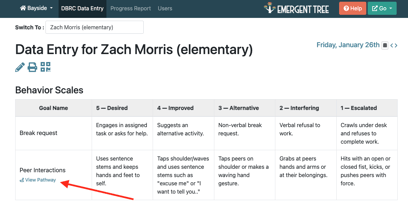
Your Pathway should now be added and clickable as a "view pathway" link in the goal you selected.
Add/Create a pathway for a new scale
1. select the edit button next to the student's name on the DBRC Data Entry tab
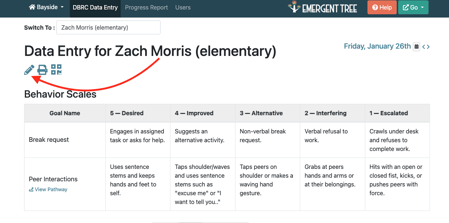
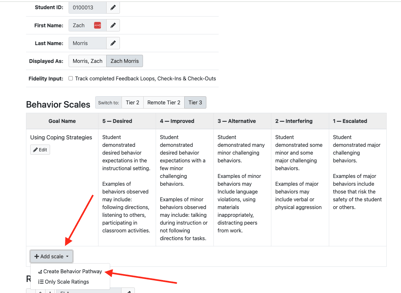
2. select "+add scale." Then select "create behavior pathway."
3. complete the prompts to create the pathway:
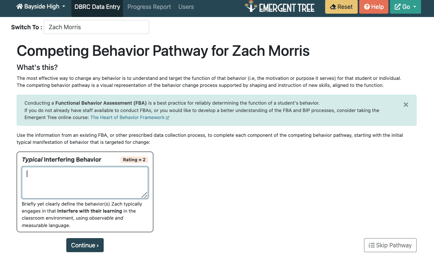
Typical Interfering Behavior
Briefly yet clearly define the behavior(s) Zach typically engages in that interfere with their learning in the classroom environment, using observable and measurable language.
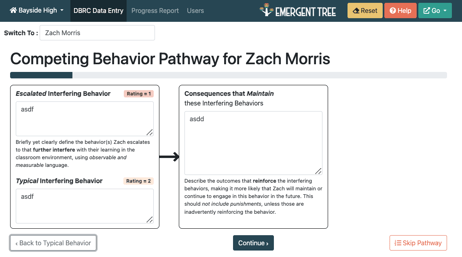
Escalated Interfering Behavior
Briefly yet clearly define the behavior(s) Zach escalates to that further interfere with their learning in the classroom environment, using observable and measurable language.
Consequences that Maintain these Interfering Behaviors
Describe the outcomes that reinforce the interfering behaviors, making it more likely that Zach will maintain or continue to engage in this behavior in the future. This should not include punishments, unless those are inadvertently reinforcing the behavior.
4. select the "continue" button to continue creating the pathway.
Antecedents that Predict the Behavior
Describe the relevant events that immediately precede and may serve to trigger the interfering behavior.
Setting Events that Increase Likelihood
Describe any circumstances or earlier events that can increase the chances that interfering behavior will occur.
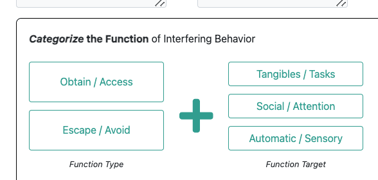
Categorize the Function of Interfering Behavior
What is the primary motivation or purpose driving Zach's behavior?
Select the type & target that best match the outcome Zach is seeking to achieve.
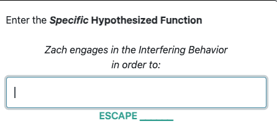
Enter the Specific Hypothesized Function
Customize the language above to accurately describe the specific target that Zach seeks to escape or avoid.
Desired Goal Behavior
Briefly yet clearly define the behavior(s) Zach should engage in whenever the antecedent occurs to foster their learning in the classroom environment.
Consequences to Reinforce the Desired Behavior
Describe the outcomes that should occur after the student engages in the desired behavior, which will reinforce their choice, making it more likely that Zach will choose to engage in this behavior in the future.
Initial Alternative Behavior
Improved Alternative Behavior
Briefly yet clearly define the behavior(s) Zach should engage in whenever the antecedent occurs, which will serve the same function (xxxxxx) but with less disruption.
Consequences to Reinforce the Alternative Behaviors
Describe the outcomes that will satisfy the function of Zach's behavior, thereby reinforcing the alternative behavior, and making it more likely that Zach will choose this over the interfering behavior in the future.
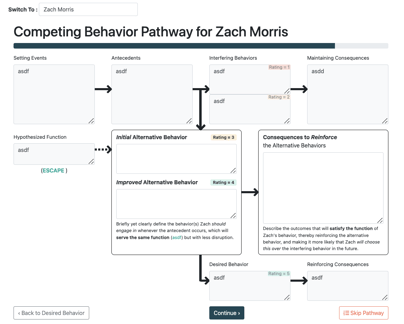
5. select the "continue" button.
6. create a "scale goal name."
7. check all pathway boxes to make sure all items are filled with the correct information. Once you're ready, select the "complete pathway" button.
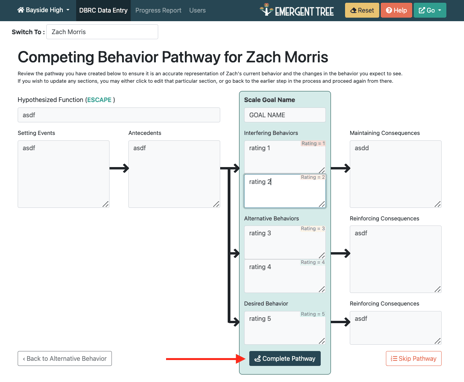
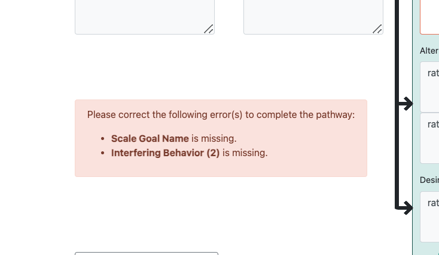
If you've missed any items in the pathway, you'll see a red error message on the page. Please address the errors in order to move forward.
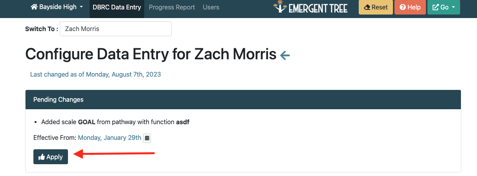
8. Make sure to select the "apply" button the edit page in order for the pathway to be saved to the new goal created.
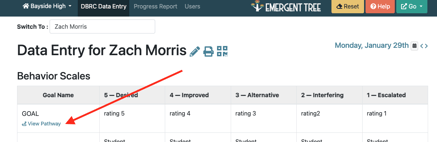
9. you will now see the new pathway and goal on the student's DBRC page. To view the pathway, click the "view pathway" link under the selected goal.
Click here to visit the FAQs page.